Familo: Find My Phone Locator
- 4.3
- Rating
- 10.00M
- Installs
- Free
- Price
 Analysis by App-foxy
I find family-location apps most useful when they remove a small amount of daily uncertainty without turning everyone’s phone into a surveillance device. Familo: Find My Phone Locator takes that practical route: it is a lifestyle app from SAFETIX LTD built around keeping track of family members through location sharing. I would not describe it as a complete safety plan, but it can be a reassuring tool when everyone involved understands what is being shared and why.
After using it as a regular household tool, my impression is that the real value comes from routine. Opening a map once in a while is easy; agreeing on when location should be available, keeping phones charged, and knowing how to interpret an old location are what make the experience dependable. Familo works best when the family treats it as a shared habit rather than a button that magically guarantees someone’s safety.
How Familo fits into an everyday family routine
I find that the most useful way to judge Familo is by how it fits into routines the family already has, rather than by how often anyone opens the map. A quick check can help with pickups or a late commute, but clear expectations make that check far less likely to cause needless worry. From there, I’d look at the small setup habits that help the whole household use it consistently.
You May Also Like

 Pandora - Music & Podcasts
Pandora’s Music Is Easy to Start, but Harder to Recover
Pandora’s strength is its low-effort path from a seed to a station. Its weak spot is how much confidence it asks you to place in connection, setup, and quiet recovery.

 8 Ball Pool
 Is Built on Rivalries, Rematches, and Routine
A close look at the rivalries, rematches, shared routines, and unanswered safety questions that turn a quick pool match into a persistent mobile community.

 Samsung Music
’s Quiet Strength Is Playing What You Already Own
Its reach comes less from spectacle than from dependable access to a personal library. That simplicity is both the app’s strongest retention engine and its ceiling.

 AccuWeather: Weather Radar
AccuWeather Review: A Quick, Clear Forecast for Everyday Decisions
For everyday plans, the best forecast is the one you can understand quickly. AccuWeather makes rain timing, radar, and local conditions easy to act on, with a few trade-offs.

 Hill Climb Racing
Why Hill Climb Racing Still Turns Crashes Into One More Run
A tiny car, a bumpy hill and one more upgrade: Hill Climb Racing keeps resurfacing because its simple chaos makes every near-miss feel personal.

 AliExpress - Shopping App
AliExpress Makes Global Shopping Feel Personal, but Shoppers Bear the Risk
AliExpress turns a global marketplace into a pocket-sized discovery engine. Its reach is useful, its shopping loop compelling, and its trade-offs easy to miss.
More From Our News Desk
View All News


The basic workflow is deliberately straightforward
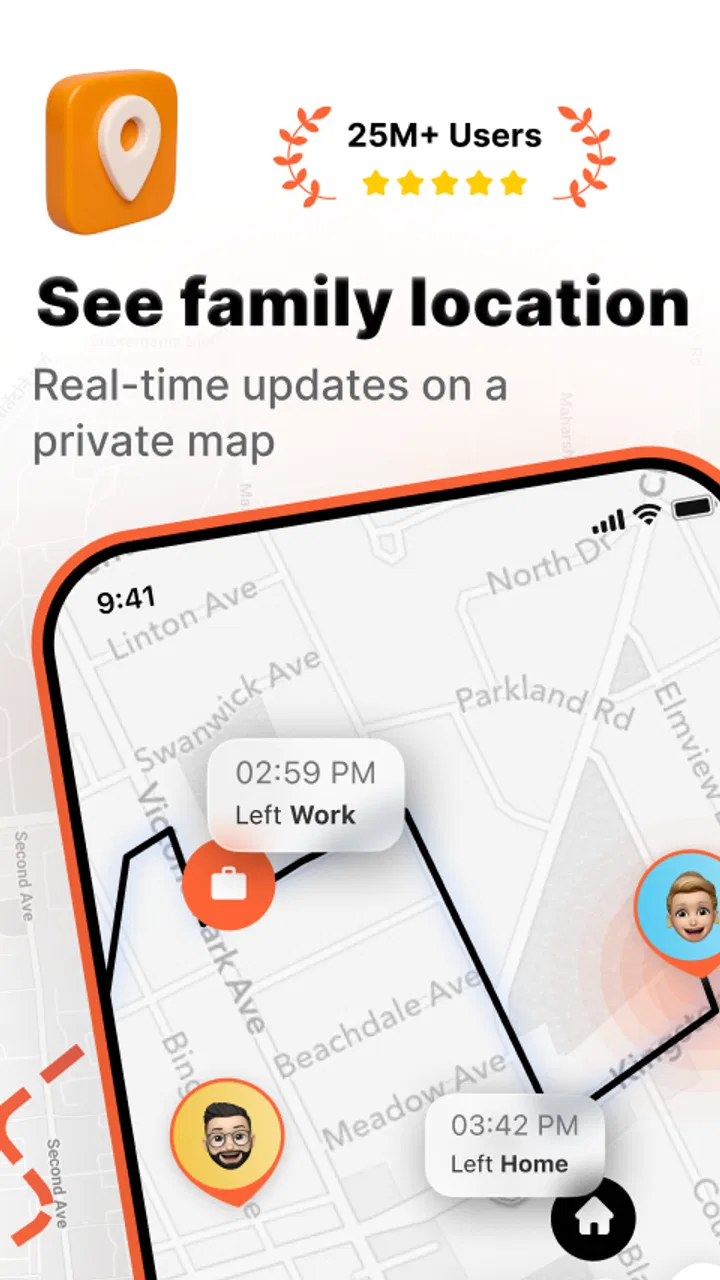
The normal starting point is to create or join a family group, then use the location view to see where participating members are. That makes the app suitable for households with children, partners, older relatives, or anyone who regularly travels alone. The useful question is not simply “Where is everybody?” but “Do I need to call, wait, or take action?” A glance at the map can answer that faster than sending several messages.
A realistic example is a weekday afternoon when one person is collecting a child, another is commuting, and someone else is already preparing dinner. Instead of asking for repeated updates, the household can check the shared location and adjust plans. If the map shows that a family member has not moved for a while, I would still contact them rather than assuming the app knows the reason. Location tells me where a phone appears to be, not whether its owner is safe, comfortable, or ready to talk.
That distinction is important. A location service depends on the phone, its connection, and the choices made by the person carrying it. It is not a replacement for a phone call, emergency services, or an agreed family check-in. I see Familo as a coordination layer: helpful for meeting up, checking progress, and reducing unnecessary messages, but not something I would use as the only response to a serious concern.
The app is free to install, which makes trying it with a household fairly accessible. It includes optional in-app purchases ranging from $2.99 to $89.99 per item, so I would review the purchase screen carefully before committing to anything. The free starting point is useful for deciding whether the family actually uses location sharing. In my experience, that trial period matters more than a long feature list because some households quickly discover that they prefer ordinary calls or occasional messages.
Who gets the most from it
Familo is a good match for families who frequently coordinate arrivals, school pickups, errands, and travel. It can also suit relatives who want a simple way to share whereabouts without learning a complicated productivity system. The app’s focus is narrower than a general messaging platform, and that is an advantage when the main task is checking a family member’s location.
I would be more cautious about recommending it to people who dislike continuous location sharing, households with unresolved trust issues, or anyone expecting precise, uninterrupted tracking. The best setup is voluntary and clearly discussed. Before adding someone, agree on who can see the location, when checking is appropriate, and what everyone should do if a phone is lost, offline, or left at home.
It is also worth considering the age rating. Familo is marked Teen, which should encourage parents to treat it as a shared family arrangement rather than an invisible monitoring tool. A teenager is more likely to use the app responsibly when the purpose is explained and the boundaries are mutual. Secret tracking may create more conflict than reassurance, even if the technical setup works correctly.
Settings and habits that deserve attention
The first setting I would check is location access on each phone. The app can only show useful information when the operating system allows it to receive location data in the way the family expects. Battery-saving behavior can also affect location freshness, so I would test the setup during an ordinary day instead of assuming that the map will always update perfectly.
Notifications deserve the same practical review. A family does not need every movement to become an alert, and too many notifications quickly become background noise. I prefer a small number of meaningful prompts, combined with a habit of opening the map only when there is a real coordination reason. If everyone receives constant updates, people may start ignoring the one notification that matters.
Another useful check is the phone’s battery position in the daily routine. A child leaving for school with a nearly empty battery is not a Familo problem alone; it is a predictable weak point in the whole workflow. Charging overnight, carrying a power bank when appropriate, and telling the family when a phone may shut down are simple habits that make location sharing more trustworthy.
I would also ask each participant to confirm that they are viewing the correct family group and understand what the map represents. Small misunderstandings can cause unnecessary worry, especially in households with several relatives or multiple phones. A short test—leaving home, arriving somewhere familiar, and comparing the map with reality—helps everyone learn how the app behaves on their own devices.
Faster patterns for busy households
Experienced users can make the app less intrusive by connecting it to repeatable moments instead of checking it constantly. For example, the household might use the map before leaving work, before starting a pickup, or when someone is late beyond an agreed window. This creates a predictable rhythm and avoids turning location checking into a reflex.
I also recommend pairing the app with a simple verbal rule: if the location looks unusual, call first. A phone may be sitting in a vehicle, a building, or a place where the signal has not refreshed. Treating a map marker as a prompt for communication—not as a final explanation—prevents many false alarms.
For school and commute routines, the useful pattern is to check progress at decision points. If the person collecting a child is already nearby, there is no need for several messages. If the person traveling has stopped somewhere unexpected, a call can clarify the situation. The app saves time because it supplies context before the conversation, not because it eliminates the need for one.
Families can also agree on a temporary exception. Someone going for a run, attending an event, or traveling through an unfamiliar area may want relatives to know where they are, while still expecting privacy at other times. The important part is making that change explicit. A location-sharing tool becomes easier to live with when people know whether a change is intentional or accidental.
On iPhone and Android devices, the exact battery and location controls may look different, so I would not copy another family member’s settings blindly. Check each phone individually, then perform the same small real-world test. This is one of the less obvious advantages of a repeatable setup: it exposes device-specific behavior before a stressful situation occurs.
Where the app’s limits become important
The biggest limitation is that Familo cannot overcome a dead, disconnected, misplaced, or poorly configured phone. A map marker that has not changed should be interpreted with caution. It may reflect a genuine stop, but it may also reflect a technical interruption. I would never use an old location as proof that someone is still at that place.
Privacy is another trade-off. Convenience increases when locations are visible, but so does the amount of personal information shared inside the group. Families should decide whether everyone needs access all the time and whether older location information should influence decisions. If a person is uncomfortable with the arrangement, forcing participation defeats the purpose of a family safety tool.
There is also a social limitation: the app cannot resolve poor communication. If relatives do not answer calls, forget to charge phones, or regularly ignore agreed check-ins, adding a map may only create new reasons to worry. In that situation, a clearer household plan may help more than another setting. Familo is strongest when it supports cooperation that already exists.
Compared with ordinary messaging, Familo is faster for a location question because the answer is presented visually rather than typed out. Compared with a phone call, it is quieter and less disruptive, but it provides less explanation and emotional context. Compared with a general family calendar, it handles whereabouts rather than appointments. I would choose Familo when location is the recurring problem, and a calendar or group chat when scheduling and conversation matter more.
I would also avoid treating it as a professional fleet-tracking or workplace-management solution. Its identity is personal and family-oriented. A household looking for a lightweight way to coordinate may appreciate that focus, while an organization needing formal records, dispatching, or operational controls should choose a tool designed for that purpose instead.
What the current app profile tells me
Familo has been available since September 18, 2013, and its current version is 2.113.3. It supports devices running Android 6.0 or later, while iOS users should still check compatibility on their own device before installing. The long availability suggests a mature product rather than a brand-new experiment, although longevity does not remove the need to test the app on the phones your family actually uses.
The app has an average rating of 4.3 from around 634 thousand ratings, with roughly 1.8 thousand written reviews, and it has passed 10 million installs. Those figures indicate broad interest and a substantial user base, but they should not replace personal testing. Location behavior can vary with device settings, network conditions, and family expectations, so a high rating cannot guarantee that every household will find the same level of reliability.
Because it is free to start and carries a Teen content rating, I see it as an easy app to evaluate with the whole family before deciding whether optional purchases are worthwhile. I would let everyone use the basic workflow first, discuss whether it reduces messages or creates tension, and only then consider paying for anything. That approach keeps the decision tied to real household value instead of curiosity about additional options.
My verdict after building a repeatable workflow
My recommendation is positive, with clear conditions. Familo is most useful when a family wants a shared location view for everyday coordination and is willing to establish sensible boundaries. Its strongest feature is not a clever shortcut; it is the way a simple map can reduce uncertainty during commutes, pickups, and errands when people are already busy.
I would skip it if the household wants guaranteed tracking, dislikes location sharing, or needs a complete emergency-response system. I would also choose a normal call or messaging app when the real need is an explanation rather than a position on a map. Those are not failures of Familo; they are signs that the problem lies outside its focused purpose.
For the right family, the best setup is simple: agree on consent, check the phone permissions, manage notifications, keep devices charged, test the map during a calm day, and call when a location looks concerning. The most reliable use of Familo is a shared habit with human judgment behind it. Used that way, this lifestyle app from SAFETIX LTD feels practical rather than intrusive, and I would recommend giving it a careful household trial.
FAQs for Familo: Find My Phone Locator
01What is Familo: Find My Phone Locator used for?
Familo is a family location-sharing and safety app designed to help approved members stay connected. After creating or joining a private family group, users can view shared locations on a map, communicate through the app, and receive selected safety notifications. It can be useful for coordinating everyday activities, checking that children or relatives arrived safely, or finding a misplaced device, depending on the features available on the installed version.
02Does Familo track someone’s location without their permission?
No. Familo is intended to work through consent-based location sharing. A person normally needs to install the app, join a family group, and allow the required permissions before their location can be displayed. Members should discuss when location sharing is appropriate and review the group settings regularly. Location services can usually be paused or disabled, although doing so may limit map updates, alerts, and other safety features.
03What permissions does Familo require, and why?
Familo may request access to location services, notifications, mobile data, and sometimes background activity or battery-related settings. Location access allows the app to update a member’s position, while notifications are used for arrival alerts, group messages, and safety events. Background access can help maintain updates when the app is not open. The exact permissions vary by Android or iOS version, so users should review them before accepting.
04Does Familo drain the phone battery or use a lot of mobile data?
Any app that regularly updates GPS location can increase battery consumption, particularly when background tracking, high-accuracy positioning, or frequent alerts are enabled. Familo’s impact depends on update frequency, signal quality, device settings, and how often the app is used. It may also use mobile data for map loading and location synchronization. Reducing unnecessary tracking, using Wi-Fi when possible, and checking battery settings can help.
05Is Familo free, and are there in-app purchases or subscriptions?
Familo may offer basic functionality at no cost while reserving some features for optional purchases or a subscription, depending on the country, platform, and current app version. Before downloading or starting a trial, check the listing in Google Play or the App Store for the latest pricing and included features. Also review renewal terms carefully, because subscriptions can renew automatically unless canceled through the relevant store settings.
Pros
- Accurate real-time location sharing with selected family members.
- Check-in feature helps confirm that someone arrived safely.
- Custom private groups make it easy to organize different circles.
- Location history can help review recent movements when needed.
- Emergency alerts provide a quick way to notify trusted contacts.
Cons
- Continuous GPS use may noticeably reduce your phone’s battery life.
- Some useful features require a paid subscription.
- Location accuracy can drop indoors or in crowded urban areas.
- All group members need the app and enabled permissions to participate.
- Constant location sharing may raise privacy concerns for some users.

Familo: Find My Phone Locator
Gallery